2. Anatomy of BlueprintFeature#
For: configurators and Blueprint developers. Needs: Tutorial 1. You will: open every asset behind BlueprintFeature and see how a sentence becomes logic, how values travel, and how the four layers look when they are all Blueprints.
Everything in this feature was built in the editor. If you can read a Blueprint graph, you can read all of it.
The eleven assets#
The assets that belong to DA_BlueprintFeature can be found under Plugins > ZagalaSpec Content > DEMO > Data > BlueprintFeature and Plugins > ZagalaSpec Content > DEMO > Blueprints > BlueprintFeature in the Content Browser.
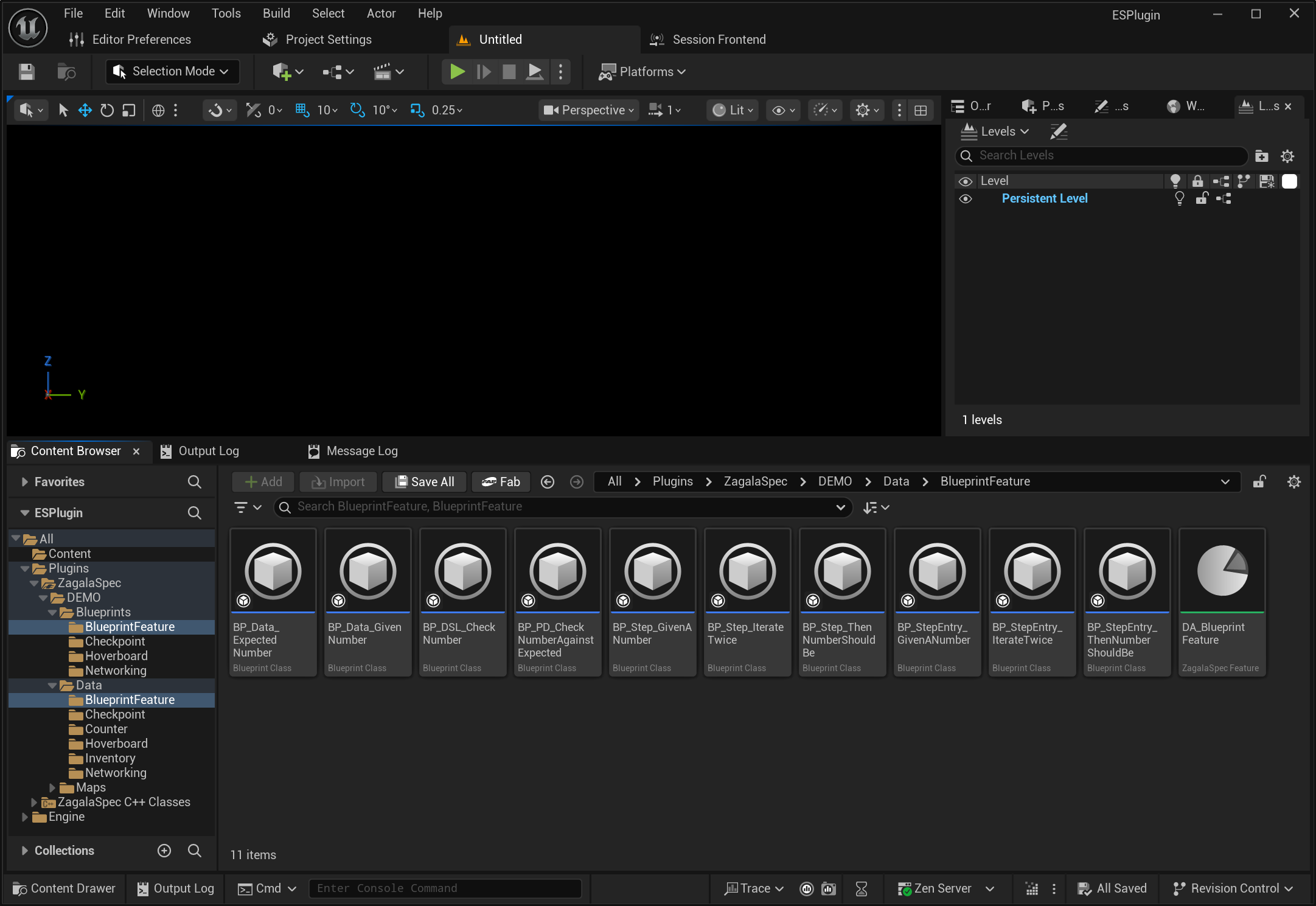
Asset |
Role |
Parent class |
|---|---|---|
|
The feature: description, two scenarios |
|
|
Recognises |
|
|
Recognises |
|
|
Recognises |
|
|
Stores the given number in the cache |
|
|
Stores the expected number, delegates the check |
|
|
Asks for a second pass |
|
|
Domain-language action: “check the number” |
|
|
Protocol driver: reads both numbers, compares |
|
|
Tagged data: the given number |
|
|
Tagged data: the expected number |
|
From sentence to step: the step entries#
Open BP_StepEntry_GivenANumber. Its Class Defaults hold two fields that matter:
Pattern:
^(?:Given |And )a number (\d+)$Step Class:
BP_Step_GivenANumber
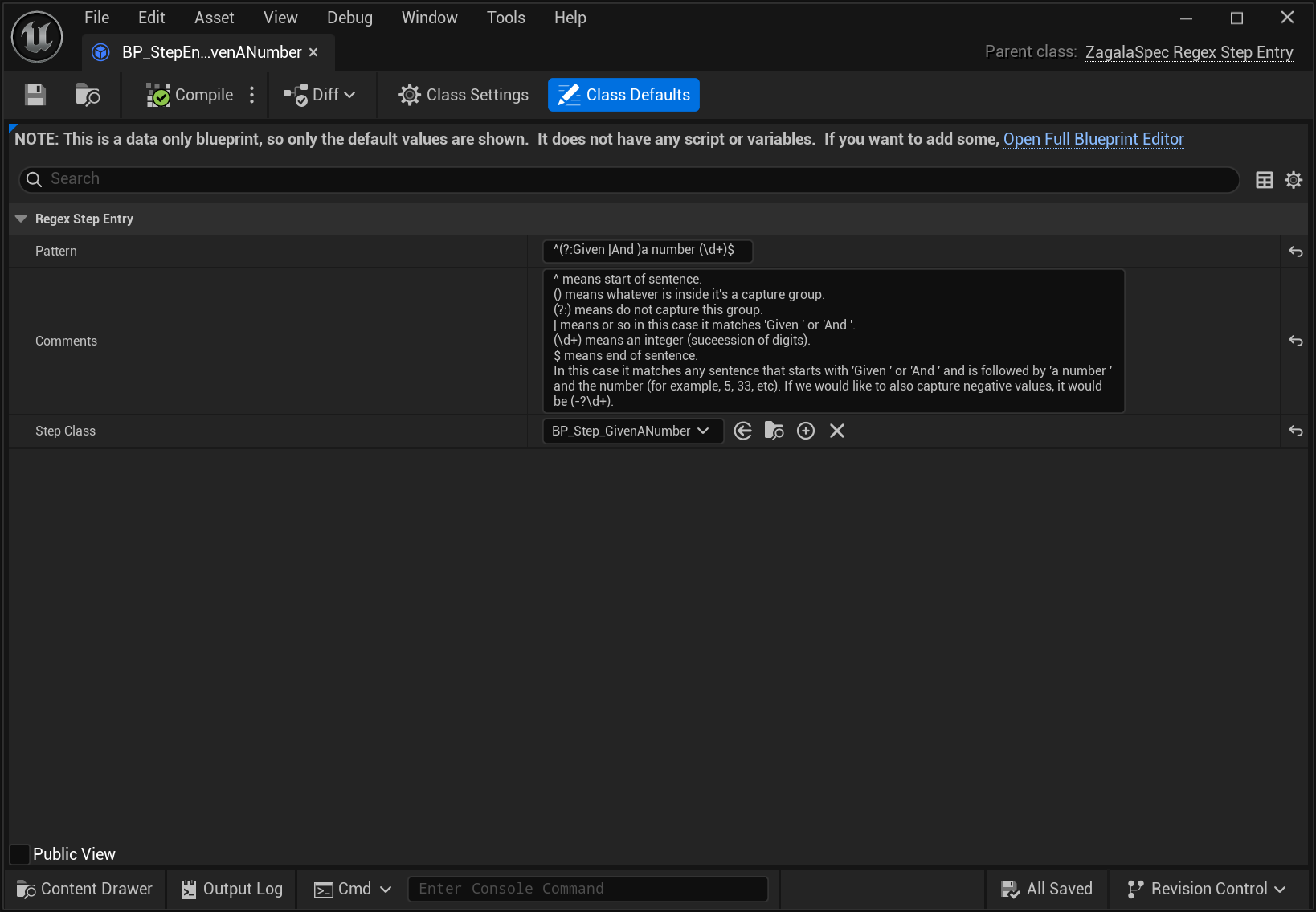
The pattern is a regular expression. (?:Given |And ) accepts either keyword without capturing it; (\d+) captures the digits. When you typed Given a number 6 in Tutorial 1, the step registry found this pattern, the text step recorded BP_StepEntry_GivenANumber as its Matched Step Entry, and a Capture Group Data entry appeared with Capture Group Value 6.
Saving a step entry Blueprint registers its pattern. If two entries claim the same pattern, the first one registered wins and the Output Log warns about the second.
BP_StepEntry_ThenNumberShouldBe does the same for ^(?:Then |And )this number should be (\d+)$ → BP_Step_ThenNumberShouldBe, and BP_StepEntry_IterateTwice for ^Given 2 iterations$ → BP_Step_IterateTwice (no capture group).
About Text Steps
In ZagalaSpec, not everything has to be set as text. Native Steps can be used directly without a corresponding text step (and their name becomes the step’s display name). Use them if you do not need parametrization via capture groups.
About Step Entries
All registered step entries can be viewed under Project Settings -> ZagalaSpec Common.
There is a helper search box that lets you write an example sentence and find the matching step entry.
From text to data: the tagged data and capture group settings#
Open BP_Data_GivenNumber. It is a tiny Blueprint with a Data Tag of ZagalaSpec.DSL.Data.Examples.BlueprintFeature.GivenNumber and a number variable. BP_Data_ExpectedNumber is the same with the tag …BlueprintFeature.ExpectedNumber.
Now go back to the feature, select Given a number 6, and expand Capture Group Customizer > Capture Groups > 0 in Details:
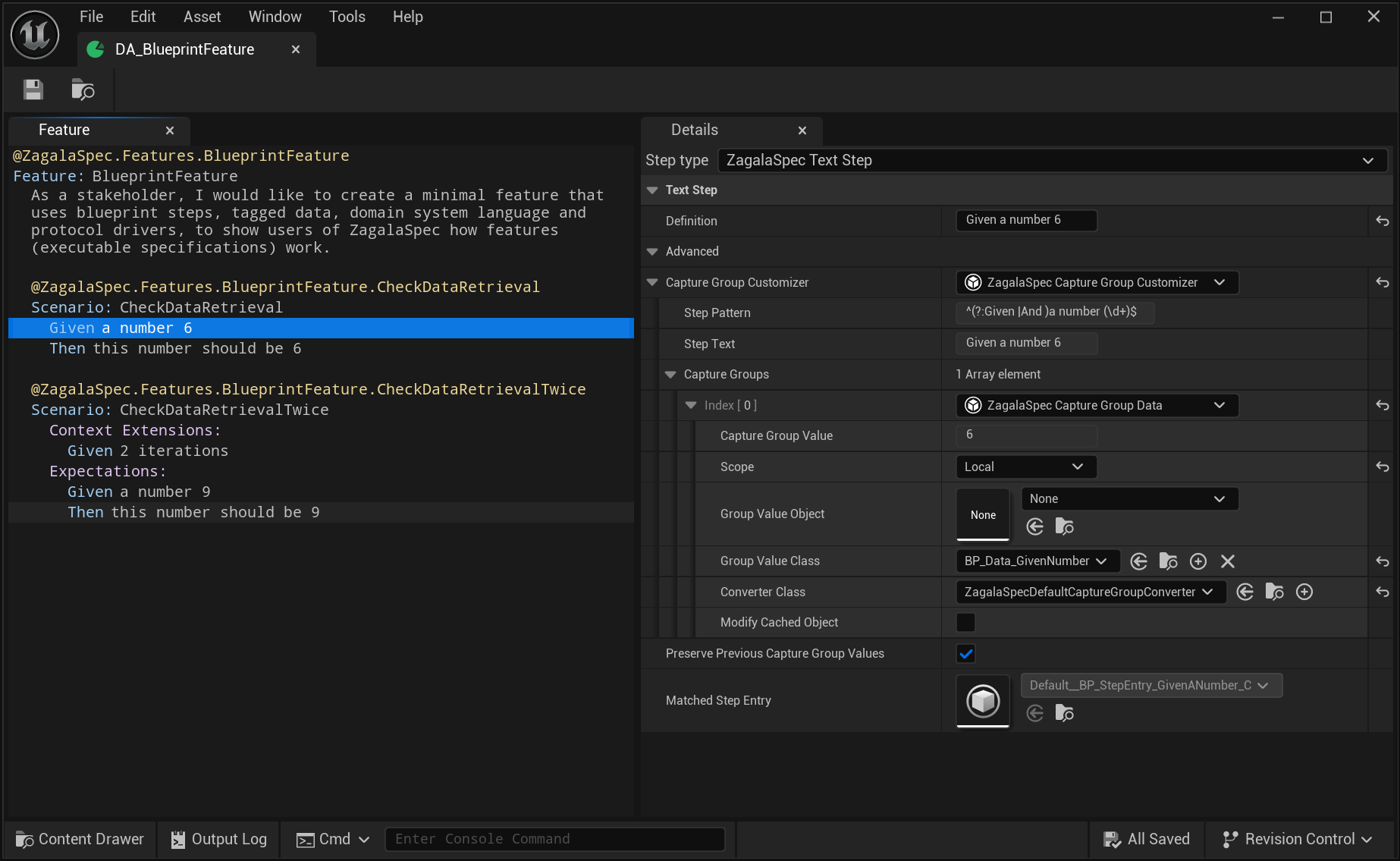
Capture Group Value:
6Scope: Local
Group Value Class:
BP_Data_GivenNumberConverter Class: the default converter
This is the configurator’s control panel. It says: when this step runs, turn the text 6 into a BP_Data_GivenNumber object and put it in the cache under its tag. The step for Then this number should be 6 is configured the same way with BP_Data_ExpectedNumber.
Other examples use the remaining options: Checkpoint points Group Value Class at small Blueprint data classes whose defaults hold tuned numbers; Counter’s examples iterator uses Group Value Object to reference an examples asset; Inventory uses Scope: Global to resolve item names through Project Settings.
The simplest step: BP_Step_GivenANumber#
Open BP_Step_GivenANumber and look at the event graph.
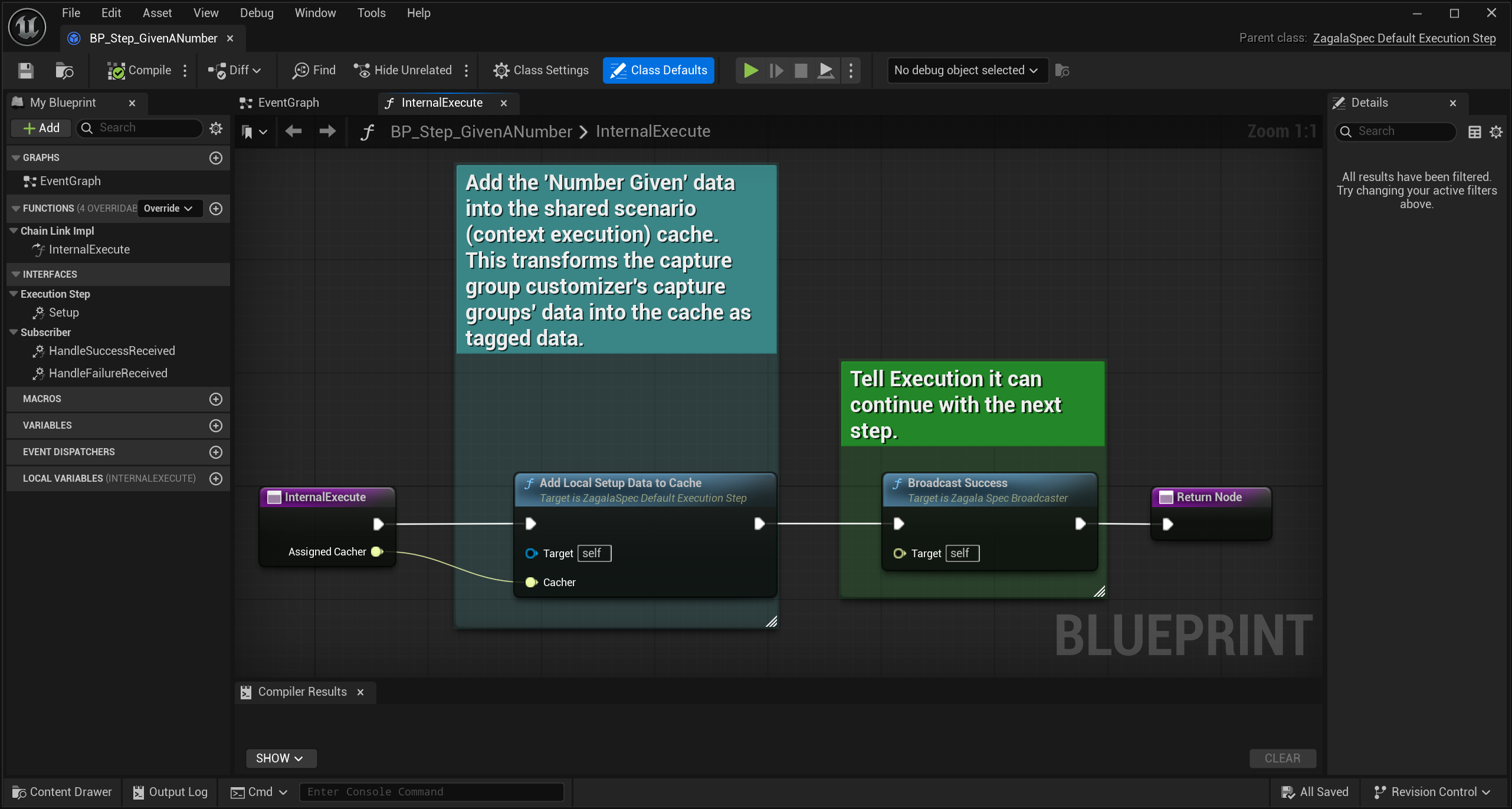
Event Internal Execute (Assigned Cacher)
  → Add Local Setup Data To Cache (Assigned Cacher)
  → Broadcast Success
Two nodes. Add Local Setup Data To Cache performs the conversion described above: every capture group becomes tagged data in the cache. Broadcast Success tells the chain to continue. There is no domain language and no protocol driver here because there is nothing to drive; the whole job is “remember this number”.
Two rules you can already see:
Call Add Local Setup Data To Cache before you need captured values.
Finish with exactly one Broadcast Success or Broadcast Failure.
The layered step: BP_Step_ThenNumberShouldBe → DSL → PD#
Open BP_Step_ThenNumberShouldBe. Its parent is UZagalaSpecChainLinkOnStep, which adds an Action variable for a child link and tears it down automatically.
Event Internal Execute (Assigned Cacher)
  → Add Local Setup Data To Cache (Assigned Cacher)
  → Construct Object: BP_DSL_CheckNumber → set Action
  → Action.Add Subscriber (Self)
  → Action.Execute (Assigned Cacher)
Event Handle Success Received → Broadcast Success
Event Handle Failure Received (Reason) → Broadcast Failure (Reason)
The step stores the expected number, then hands over to a domain-language action and waits. Whatever the action reports, the step forwards.
Open BP_DSL_CheckNumber (parent UZagalaSpecChainLinkOnChainLink). It does exactly the same dance one level down: construct BP_PD_CheckNumberAgainstExpected, subscribe, execute, forward. It exists so that “check the number” has a name of its own; today it is a pass-through, tomorrow it could run two drivers or add logging without the step changing.
Open BP_PD_CheckNumberAgainstExpected (parent UZagalaSpecDefaultChainLink):
Event Internal Execute (Assigned Cacher)
  → Get Data (Assigned Cacher, BP_Data_GivenNumber)    → Given
  → Get Data (Assigned Cacher, BP_Data_ExpectedNumber) → Expected
  → Given == Expected ?
       true  → Broadcast Success
       false → Broadcast Failure ("given number X does not match expected number Y")
The protocol driver is the only layer that reads the cache and does the comparison. In a real feature this is where you would call your actor, component or subsystem.
        flowchart TB
    subgraph Scenario
        S1["Given a number 6<br/>BP_Step_GivenANumber"]
        S2["Then this number should be 6<br/>BP_Step_ThenNumberShouldBe"]
    end
    S1 -- "BP_Data_GivenNumber" --> Cache[("Cache")]
    S2 -- "BP_Data_ExpectedNumber" --> Cache
    S2 --> DSL["BP_DSL_CheckNumber"] --> PD["BP_PD_CheckNumberAgainstExpected"]
    Cache -- "both numbers" --> PD
    PD -- "success / failure(reason)" --> DSL -- "forward" --> S2
The iteration step: BP_Step_IterateTwice#
The second scenario has Given 2 iterations as a context extension. Open BP_Step_IterateTwice:
Its graph’s Internal Execute just calls Broadcast Success.
Its Class Settings implement the ZagalaSpec Iteration Controller interface, with two functions:
Has Pending Iteration returns
IterationIndex < 2.Update Iteration increments
IterationIndex.
After the first pass, the context asks every extension Has Pending Iteration?. This one says yes, so the context clears the cache, calls Update Iteration on every controller, and runs both chains again. On the second pass the answer is no and the scenario finishes. Watch the Output Log while running CheckDataRetrievalTwice: the two expectation steps appear twice.
Why layers, and when to skip them#
BP_Step_GivenANumber proves you can do everything in the step. BP_Step_ThenNumberShouldBe shows the full stack: step → DSL → PD → system. The layers pay off when:
several steps share one game interaction (write one driver, many steps);
several features touch the same system (change the driver once);
stakeholders rename sentences often (the step entry changes, the drivers do not).
Until then, keep it flat. The three rules hold either way: convert captured values with Add Local Setup Data To Cache, broadcast exactly once, and if a link can run again (iterations, several scenarios) reset its state in Internal Teardown. Use a Native Step when a step needs no sentence and no values at all.
Next: 3. The Counter feature shows the same layering in C++ with a real system under test.