5. Examples tables and iteration#
For: configurators. Needs: Tutorial 3. You will: read the Inventory feature in .zagalaspec form, see how one word ("Sword") flows through several steps, run a scenario against a table of rows without a Scenario Outline, and build your own examples asset.
The feature as text#
Source/ZagalaSpecExamples/Features/Inventory.zagalaspec in the installed plugin, imported as Plugins > ZagalaSpec Content > DEMO > Data > Inventory > DA_Inventory:
@ZagalaSpec.Import.Features.Inventory
Feature: Inventory
  As a developer using ZagalaSpec
  I want to manage an in-memory inventory through the full execution stack
  So that I have a canonical example of global and local capture groups and
  iterator-based data-driven testing without Scenario Outline.

  Shared Context Extensions:
    Given a fresh empty inventory

  @ZagalaSpec.Import.Features.Inventory.FreshInventoryStartsEmpty
  Scenario: Fresh inventory starts empty
    Then the inventory has 0 of "Sword"

  @ZagalaSpec.Import.Features.Inventory.GlobalCaptureFlowsAcrossSteps
  Scenario: Global capture flows across steps
    Context Extensions:
      Given I focus on item "Sword"
    Expectations:
      When I add 3 of that item
      Then the inventory has 3 of "Sword"
      And the inventory has 3 of that item

  @ZagalaSpec.Import.Features.Inventory.LocalCapturesInSingleStep
  Scenario: Local captures in a single step
    When I add 10 of "Arrow" directly
    Then the inventory has 10 of "Arrow"

  @ZagalaSpec.Import.Features.Inventory.PresetLoadsDefaultStock
  Scenario: Preset loads default stock
    Context Extensions:
      Given the default stock is loaded
    Expectations:
      Then the inventory has 5 of "Arrow"
      And the inventory has 1 of "Sword"

  @ZagalaSpec.Import.Features.Inventory.IteratorReplacesScenarioOutline
  Scenario: Iterator replaces Scenario Outline
    Context Extensions:
      Given iterate over inventory <Examples>
    Expectations:
      When I add the focused item and quantity
      Then the inventory has the focused quantity of that item
Run it: Session Frontend, search Features.ZagalaSpec.Import.Features.Inventory, five green rows.
The .zagalaspec sections#
The native format is Gherkin plus three keywords, and this file uses all of them:
Shared Context Extensions:under the feature: setup that runs before every scenario (Gherkin’sBackground).Context Extensions:under a scenario: setup for that scenario only. Gherkin has no equivalent; on export to.featurethese become ordinary leading steps.Expectations:under a scenario: the Given / When / Then steps. Required wheneverContext Extensions:is present; omitted when a scenario has no extensions (see Local captures in a single step).A
@tagline immediately beforeFeature:orScenario:becomes its identifier. Without one, the identifier is generated from the title.
The split matters at run time: extensions run first, can ask for more passes (next section), and if one fails the expectations are skipped.
One word, many steps: global capture#
Look at Global capture flows across steps. "Sword" is named in the context extension Given I focus on item "Sword"; two later steps say that item and still know it is the sword, and one says "Sword" again.
Two mechanisms are at work:
The focus step writes to the cache for everyone.
Given I focus on item "Sword"stores anZagalaSpecDataItemNameobject under the item-name tag. Every later step written to read the focused item (I add 3 of that item,the inventory has 3 of that item) finds it there. Nothing on those steps needs configuring: the cache carries the value through the scenario.Quoted names resolve globally. Select
Then the inventory has 3 of "Sword"and expand the second capture group. Its Scope is Global and there is no Group Value Class on the step. ZagalaSpec looked the textSwordup in Project Settings > ZagalaSpec > Global Capture Group Classes, where the plugin ships two rows:Capture Group Value
Group Value Class
Converter
SwordZagalaSpecDataItemNamedefault
ArrowZagalaSpecDataItemNamedefault
Global scope means “this word has one meaning for the whole project”. Any sentence that captures
Sword, in any feature, produces the sameZagalaSpecDataItemNameobject, so a step can be written once and never care which sentence supplied the name. To add an item your designers talk about, add a row; no step changes.
Compare with Local captures in a single step: When I add 10 of "Arrow" directly captures both the quantity and the name itself and uses them immediately. Local is the default and the right choice when a value is only meaningful inside one sentence.
Rows without a Scenario Outline: the iterator#
Iterator replaces Scenario Outline has no <amount> placeholders in its expectations at all. Its extension Given iterate over inventory <Examples> matches the Inventory example’s iterator step entry (^(?:Given |And )?iterate over inventory <(.+)>$), and the capture group’s Group Value Object points at the asset DA_Inventory_ItemQuantity_Examples next to the feature.
Open that asset:
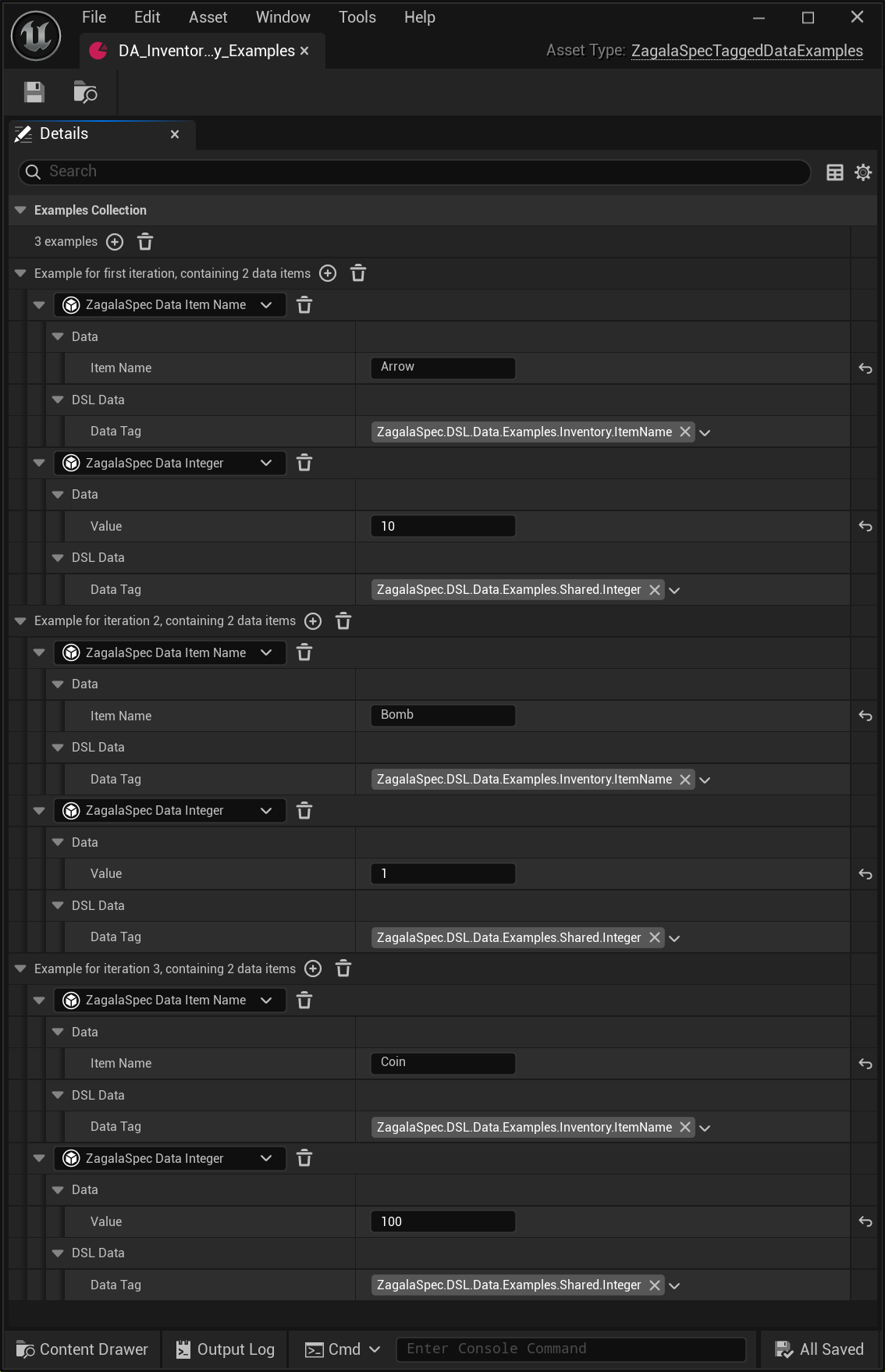
Examples Collection is the table. Its first line counts the rows (
3 examples); each row is a group named after the pass that uses it: Example for first iteration, containing 2 data items, Example for iteration 2, containing 2 data items, and so on.Each row lists the tagged data objects it provides, with their properties inline: an
ZagalaSpecDataItemNameand anZagalaSpecDataInteger(the quantity). The dropdown on each object’s line shows its type; properties marked Advanced sit in a collapsed Advanced group.
On each pass the iterator writes the current row’s objects into the cache, then the two expectation steps read the focused item and quantity from there. When the row is used up, the iterator reports a pending iteration, the context clears the cache, advances the row, and runs the pass again. Three rows, one scenario, one green line. Because the shared extension Given a fresh empty inventory resets the inventory in its teardown, every row starts clean.
The core plugin ships a generic iterator sentence as well: Given examples from <YourExamplesAsset> (used by Counter’s Increment table). The Inventory-specific wording exists only to show that a project can name its own.
Build your own examples asset#
Add > Miscellaneous > Data Asset, choose ZagalaSpec Tagged Data Examples, name it
Inventory_MoreStock_Examples.Open it. Under Examples Collection, press + next to the
0 examplescount three times. Each press adds one Example for … iteration row.In each example press + on its header twice. In the first new line’s dropdown pick
ZagalaSpecDataItemNameand set Item Name (Sword,Arrow,Shield). In the second pickZagalaSpecDataIntegerand set Value (2,7,1). The trash button next to a dropdown removes that object; the one on an example header removes the whole example.To reuse rows, right-click an example header or a tagged data line and choose Copy, then right-click a target and choose Paste. A copied example pasted on the
N examplesline is added as a new example; pasted on an example header it replaces that example. A copied tagged data object pasted on an example header is added to that example; pasted on a tagged data line (an empty one included) it replaces that object. Pastes are deep copies and can be undone.Save.
Open the
DA_Inventoryfeature, add a scenarioZagalaSpec.Import.Features.Inventory.MoreStock. In its Context Extensions addGiven iterate over inventory <MoreStock>; in the step’s capture group set Group Value Object to your new asset. In Expectations addWhen I add the focused item and quantityandThen the inventory has the focused quantity of that item.Save, refresh, run. One row, three passes.
Shield was never mentioned in a sentence, so it needs no Global Capture Group row: the examples asset supplies the object directly.
What you learned#
.zagalaspecseparates shared setup, per-scenario setup and expectations, and round-trips without loss.Global scope turns a word into a project-wide meaning via Project Settings; Local scope keeps a value inside its sentence.
An examples asset plus an iterator extension replaces Scenario Outline: rows are data, the scenario stays single.
Next: 6. World-based features for features that need a level and physics. Programmers: 9. Inventory in C++ reads the C++ behind this page.