7. Create a new step in Blueprint#
For: Blueprint programmers. Needs: Tutorial 2. You will: add the sentence Then this number should be greater than N to BlueprintFeature using three Blueprints and no C++.
The pattern is the one every step follows: a tagged data class for the value, a step that does the work, and a step entry that connects a sentence to the step.
1. The tagged data: Data_Threshold#
In your project’s Content folder, Add > Blueprint Class, search for and pick ZagalaSpec Tagged Data as parent. Name it
Data_Threshold.Open it. In Class Settings > Interfaces, add ZagalaSpec Value Store. This lets the default converter hand the captured text to your class.
Add an integer variable
Threshold.Implement the interface event Store Value (right-click the graph, Event Store Value):
String to Int (Value To Store)→Set Threshold.In Class Defaults set Data Tag to a new gameplay tag, for example
MyGame.Data.Threshold(create it in Project Settings > Gameplay Tags or with the + in the tag picker).Compile and save.
BP_Data_GivenNumber in BlueprintFeature is built exactly like this; open it to compare.
2. The step: Step_NumberGreaterThan#
Add > Blueprint Class, parent ZagalaSpec Default Execution Step. Name it
Step_NumberGreaterThan.Open the event graph. Override Internal Execute (it has one input, Assigned Cacher). Build:
Event Internal Execute (Assigned Cacher)
  → Add Local Setup Data To Cache (Assigned Cacher)
  → Get Data (Assigned Cacher, BP_Data_GivenNumber)  → cast → Given
  → Get Data (Assigned Cacher, Data_Threshold)    → cast → Threshold
  → Branch: Given.Number > Threshold.Threshold
       true  → Broadcast Success
       false → Broadcast Failure (Reason = Format "given number {0} is not greater than {1}")
Get Data and the other cache nodes are under DSL in the node palette (they come from UZagalaSpecTaggedDataHandler); pass the Assigned Cacher object as the first input and the class as the second.
3. Add a guard: if either Get Data returns null, Broadcast Failure with a reason and stop. A step must broadcast exactly once on every path, including the ones you did not expect.
4. Compile and save.
This step does everything inline, like BP_Step_GivenANumber. If you wanted the layered form, you would make the parent ZagalaSpec Chain Link On Step (from the examples module), construct a DSL Blueprint into Action, subscribe and execute, as BP_Step_ThenNumberShouldBe does.
3. The step entry: StepEntry_NumberGreaterThan#
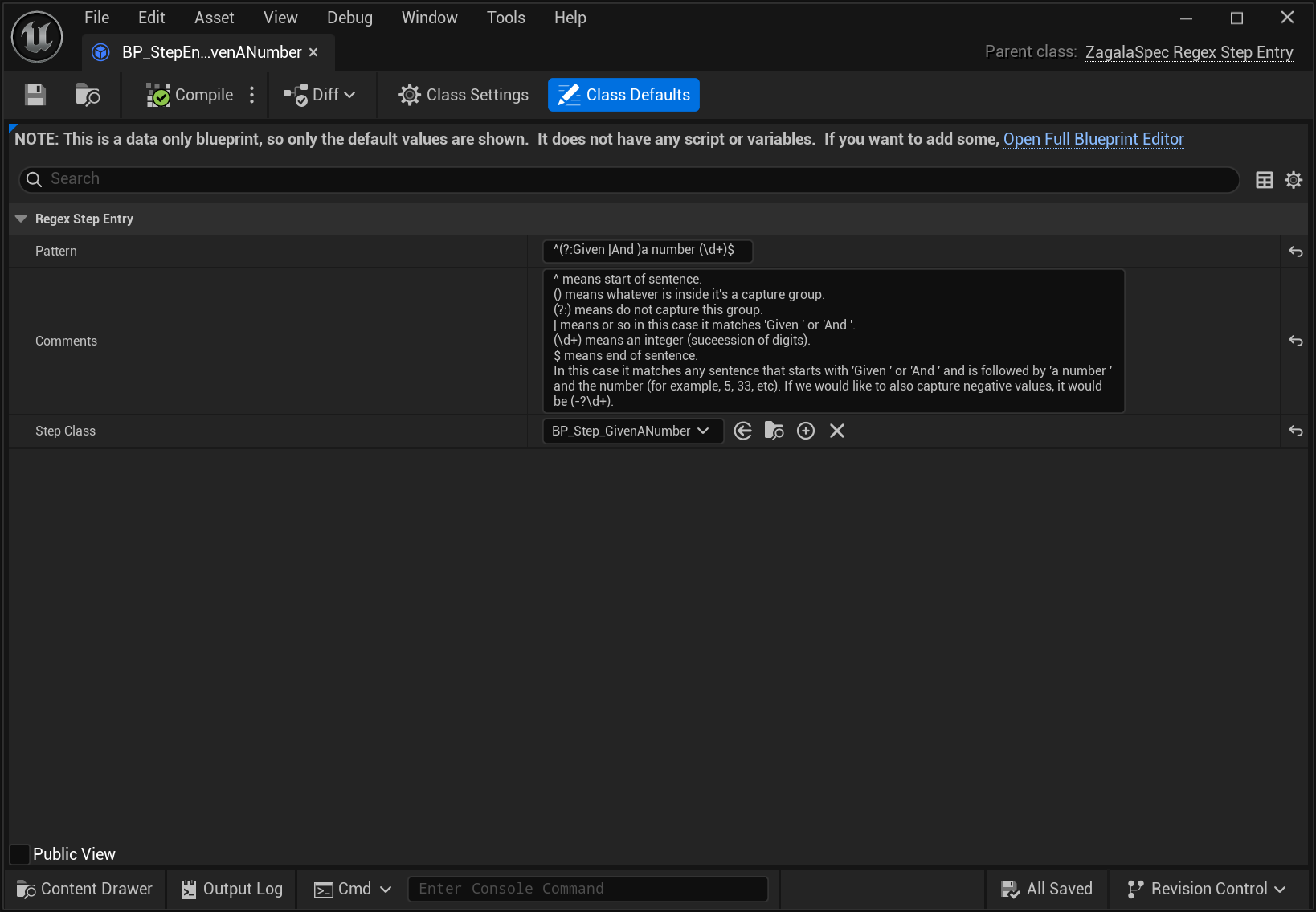
Add > Blueprint Class, parent ZagalaSpec Regex Step Entry. Name it
StepEntry_NumberGreaterThan.In Class Defaults:
Pattern:
^(?:Then |And )this number should be greater than (\d+)$Step Class:
Step_NumberGreaterThanComments (optional): what the sentence means, for whoever reads the registry later.
Save. Saving registers the pattern. Check Window > Output Log: no
LogZagalaSpecwarning about a duplicate pattern should appear. If one does, another entry already owns that exact pattern and yours is ignored until you change it.
4. Use it#
Open
BlueprintFeature(or your own feature). In Check Data Retrieval press + on Expectations and typeAnd this number should be greater than 5.Matched Step Entry shows
StepEntry_NumberGreaterThan. Expand the capture group: Capture Group Value5, Scope Local. Set Group Value Class toData_Threshold.Press Check. Green. Change the sentence to
greater than 6; red, with your reason. Restore it and save.
Tip
Setting the Group Value Class by hand on every use gets old. Two ways around it: add a Global Capture Group Classes row in Project Settings for words that always mean the same thing and have configurators switch the group’s Scope to Global; or, in C++, read the raw capture text in the step’s Setup so no class is needed at all (Tutorial 9 shows UZagalaSpecCEFocusItem doing exactly that).
Rules you just followed#
The tagged data class implements ZagalaSpec Value Store so text becomes a value.
The step calls Add Local Setup Data To Cache before reading, reads through Get Data, and broadcasts exactly once per path.
The step entry’s pattern is unique, anchored with
^and$, and keeps keywords in a non-capturing group so that only values are captured.If the step held state (a spawned actor, a timer), it would reset it in Internal Teardown.
Next: 8. Create a new step in C++ does the same in C++.