4. Write a feature and import it#
For: stakeholders and configurators. Needs: Tutorial 3, a text editor. You will: write a new feature in a text file that reuses the Counter steps, import it, confirm every sentence is understood, run it, and export it back.
This is the everyday loop for a team that writes specifications outside Unreal.
Write it#
Create Doubling.feature anywhere on disk:
Feature: Doubling
  As a designer
  I want to see that two equal increments add up
  So that I trust the counter before I build on it

  Background:
    Given a fresh counter

  Scenario: Two increments of four
    When I increment the counter by 4
    And I increment the counter by 4
    Then the counter value is 8

  Scenario: Reset in the middle
    When I increment the counter by 4
    And I reset the counter
    And I increment the counter by 4
    Then the counter value is 4

  Scenario: A negative increment is ignored
    When I increment the counter by 4
    And I increment the counter by -4
    Then the last counter operation failed
    And the counter value is 4
Every sentence is one the Counter steps already understand. That is the point of a shared step vocabulary: once a sentence exists, anyone can use it in any number of new scenarios.
Tip
Not sure which sentences exist? Open any bundled feature and read its steps, or export it (below) to get the sentences as text. Programmers can also show you Project Settings > ZagalaSpec > Regex Records, the list of every registered pattern.
Import it#
In the Content Browser, create or pick a folder (for example
Content/Features).Drag the file onto the Content Browser or right-click and choose Import to Current Folder. You can also right-click the folder, choose Import Feature File… and select
Doubling.featureto import it without showing the preview dialog.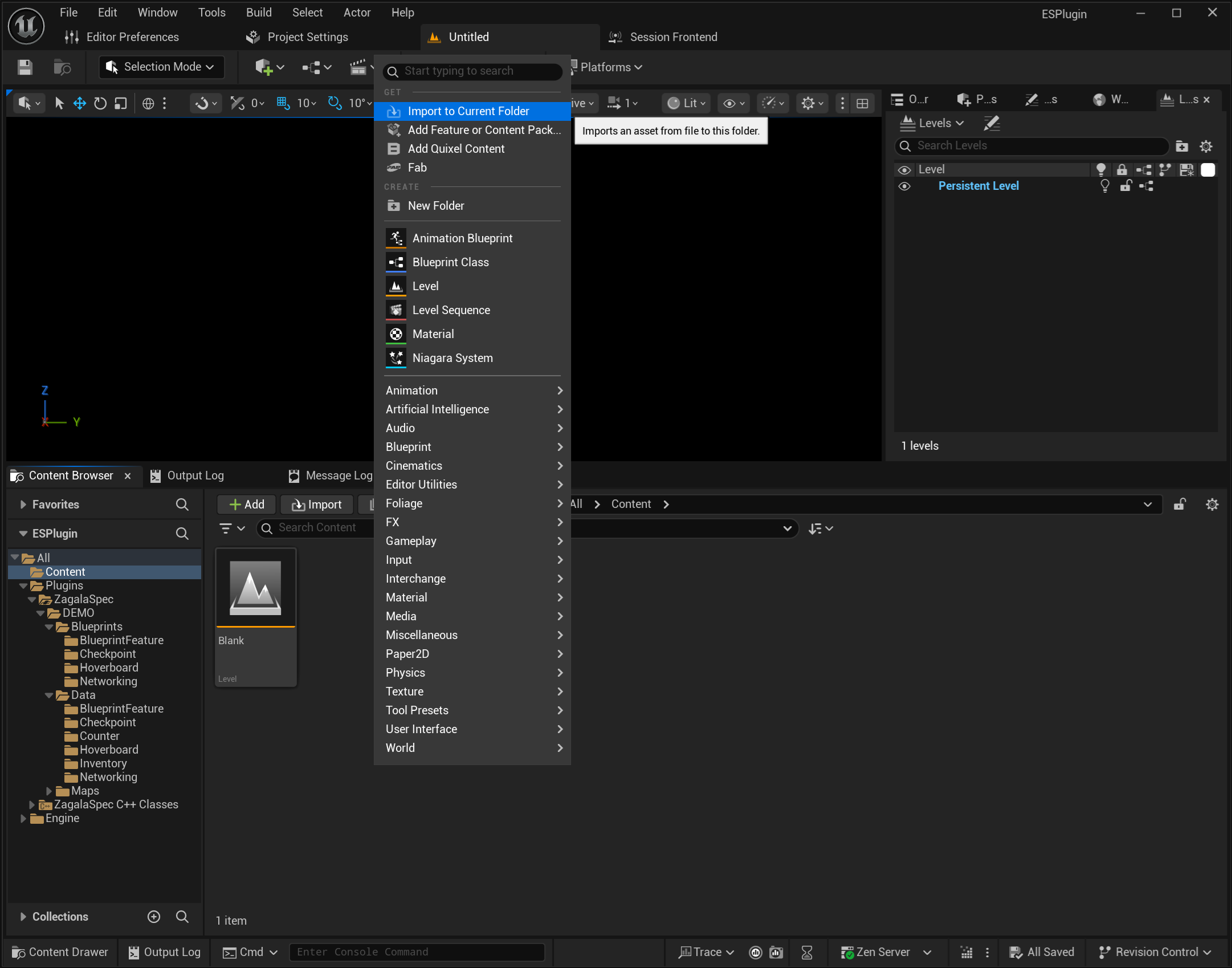
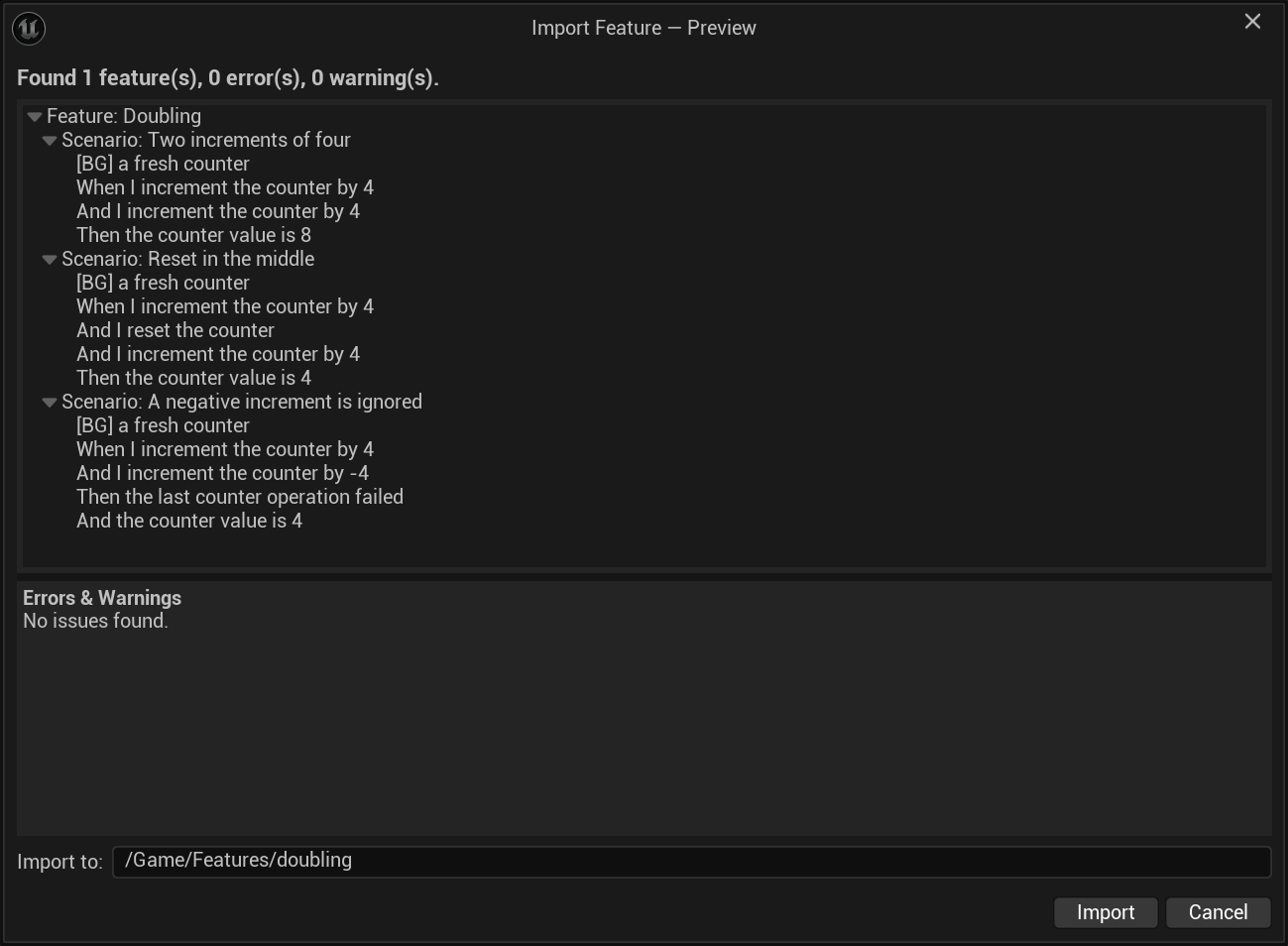
The Import Feature — Preview dialog opens. Check:
one feature, three scenarios, the
[BG]background step and every expectation listed;0 error(s) in the summary line;
the Import to: path is the folder you want.
Press Import.
A Doubling Feature asset appears in the folder, tagged ZagalaSpec.Import.Features.Doubling, with scenarios tagged …Doubling.TwoIncrementsOfFour, …Doubling.ResetInTheMiddle and …Doubling.ANegativeIncrementIsIgnored.
Confirm every sentence is understood#
Open the asset. Click each step and check Matched Step Entry in Details. All of them should name an ZagalaSpecExamplesStepEntry… entry.
To see what an unmatched sentence looks like, add a step When I double the counter to any scenario. Its Matched Step Entry stays empty. If you ran the scenario now it would fail at that line with a message saying no step class could be created. Delete the step again (the trash icon on its row), or keep it and untick Include In Tests on that scenario until a programmer adds the step (7. Create a new step in Blueprint).
Import never fails because of an unmatched sentence. It is normal for a freshly written feature to contain sentences nobody has implemented yet: that is the red part of red-green.
Run it#
Save the asset. In the Session Frontend press Refresh Tests, search Doubling, run. Three green rows.
Export it#
Right-click the Doubling asset and choose Export as Gherkin (.feature). Pick a location. Open the file: the background, scenarios and sentences are back, ready to be reviewed in a pull request, pasted into a ticket, or opened in any Gherkin tool.
Also try Export as ZagalaSpec (.zagalaspec). The .zagalaspec form keeps ZagalaSpec-specific structure (per-scenario context extensions, shared context extensions) and re-imports without loss. Use it as the archival format; use the others to talk to people in other tools.
Warning
Capture group settings (which class a value becomes, Global scope, injected assets) live in the asset and are not written to any export. After a re-import, re-check steps whose capture groups were customised.
What you learned#
A feature written in a text editor becomes an asset with Import Feature File…; the preview dialog is where you catch format problems.
Reusing sentences means no code for new scenarios.
Matched Step Entry tells you whether a sentence will run; an empty one is a to-do for a programmer, not an import error.
Exports give the team a readable copy;
.zagalaspecis the lossless one.
Next: 5. Examples tables and iteration for data-driven scenarios and the .zagalaspec sections.